DocumentationGetting started
Introduction
What Agentbits is, the ideas it is built on, and how a request moves from you to a finished result.
Agentbits is a desktop app where you build your own team of AI agents: a lead plus specialists with different roles. You hand them work the way you would hand it to people. The lead splits your request into tasks, assigns them, reviews the results and remembers what was decided, and you watch the whole team work in one window.
What it is for
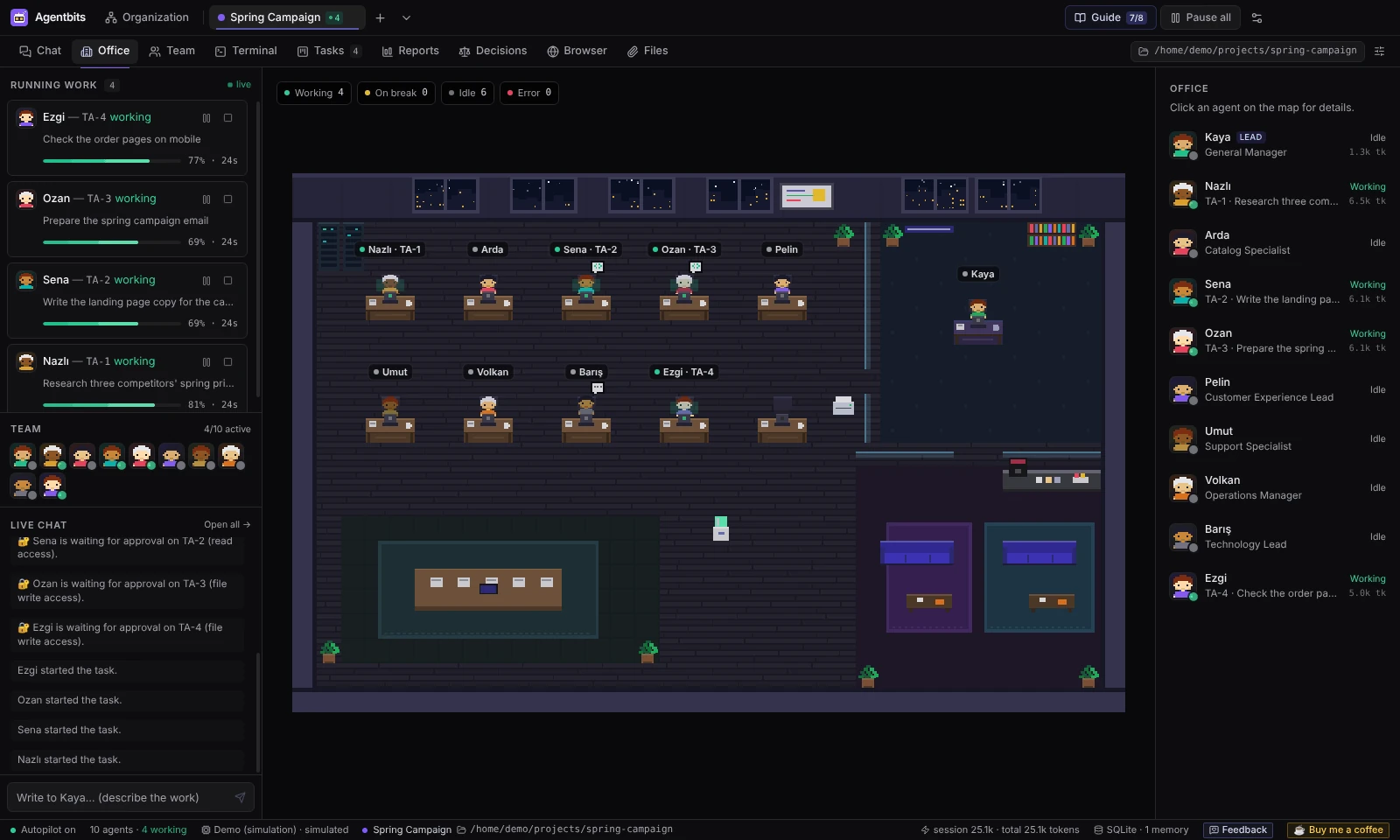
Instead of opening one chat window per task and copying text between them, you describe the goal once. The team plans it, works on it in parallel and reports back. At any moment you can see who is doing what: in a pixel-art office, on a Kanban board and in each agent’s terminal.
The work is not limited to code. Agents can do research, document and data analysis, reporting, writing, planning, and server or database checks. What an agent can actually do depends on its provider and on the permissions you give it.
Agentbits is version 0.1.0, an MVP. It runs on Windows first; macOS is experimental. See Limitations for what it does not do yet.
Key ideas
| Idea | What it means |
|---|---|
| Organization | Your AI organization: companies, departments and teams, nested as deep as you like. Six ready-made templates get you started. |
| Agent | A team member with a name, role, job description, skills, a look, a provider and model, and its own permissions. |
| Lead | The agent you talk to. It turns your message into tasks, assigns them and reviews finished work. |
| Project | A folder on your computer plus the teams that work on it. Tasks, chat, decisions, reports and memory belong to the project. |
| Task | One piece of work on the board: To do → In progress → In review → Done. |
| Autopilot | Hands the next task to a free team member, so work starts without you clicking anything. |
| Memory and decisions | Task summaries, review notes and accepted decisions are stored and given back to agents on later runs. |
| Provider | What the agents think with: Claude Code CLI, Codex CLI, the Anthropic or OpenAI API, or the free Demo. |
Agents are shared across projects. One agent works on one task at a time, but its team can be assigned to several projects.
How a request flows
- You describe the goal. In the project’s Chat → #general, you write to the lead, for example: “Research three competitors’ pricing. Write the landing page copy. Prepare the campaign email.” You can attach files.
- The lead plans. It splits the request into tasks and assigns each one to a project member, based on their role, skills and job description. The tasks appear on the Tasks board.
- Agents work. Autopilot gives tasks to free agents. Each agent runs with its own provider, permissions, files and connections. Agents set to Require approval wait for you to approve them first.
- The lead reviews. Finished work goes to In review. The lead approves it (it moves to Done) or sends it back with a revision note.
- The project keeps the result. Task reports, decisions and memory stay with the project for later work.
While this happens, you can step in. From an agent’s terminal you can redirect it, queue an instruction or give it a new task. Pause all in the top bar pauses every agent.
Where you see the work
Each project has its own sections in the top bar (Ctrl+1…9):
- Chat: talk to the lead, message agents directly, read task threads.
- Office: the project’s team in a pixel office. Agents sit at their desks while working, take coffee breaks and show approval or error badges.
- Team: the agents working on this project, their teams, the lead and token usage.
- Terminal: a live transcript for every agent, plus real shells (PowerShell or bash).
- Tasks: the Kanban board.
- Reports: task reports, the daily report and token usage.
- Decisions: decisions proposed by agents and the lead.
- Browser: an in-app browser for you (agents can’t use it yet).
- Files: files you uploaded, files agents produced and changes in the project folder.
The Organization page (Ctrl+O) holds your units, agents, templates, skills, apps and connections. Settings (Ctrl+,) holds providers, the permission matrix, memory and data management.
Local first
Everything is stored in a SQLite database on your computer. There is no Agentbits server, no account and no telemetry. Network traffic goes only to the providers, connections and apps you set up, to GitHub when you install a skill, and to the sites you open in the Browser tab.
API keys, passwords and tokens are encrypted with your operating system’s keychain and are never shown to agents. Agents get access to connections, files, skills and apps only when you grant it. See Security for the full model and its honest limits.
License
Agentbits is source-available, not open source. It is licensed under the PolyForm Strict License 1.0.0: you may use it for personal and other noncommercial purposes, but you may not modify or redistribute it. For commercial use, get in touch through GitHub issues.
Next steps
- Install Agentbits.
- Follow the Quick start to build a team and give it its first job.
- Choose a provider for real work.
Found something wrong or missing? Open an issue on GitHub