You lead.Your AI team gets things done.
Agentbits is a desktop app for running a team of AI agents. Describe the goal to your lead: it splits the work into tasks, hands them to specialists and reviews what comes back. You watch it all happen, and your data stays on your computer.
- Windows 10 and 11
- macOS experimental
- Free for personal use
- Version 0.1.0
To do 0
In progress 0
In review 0
Done 0
- 1You describe the goal
- 2The lead plans tasks
- 3Agents work in parallel
- 4The lead reviews
- 5The project remembers
A simulation of the app, in the spirit of its Demo mode.
One window for the whole team
The office, the board and the terminals show the same work from different angles. These screenshots were taken in Demo mode with example data.
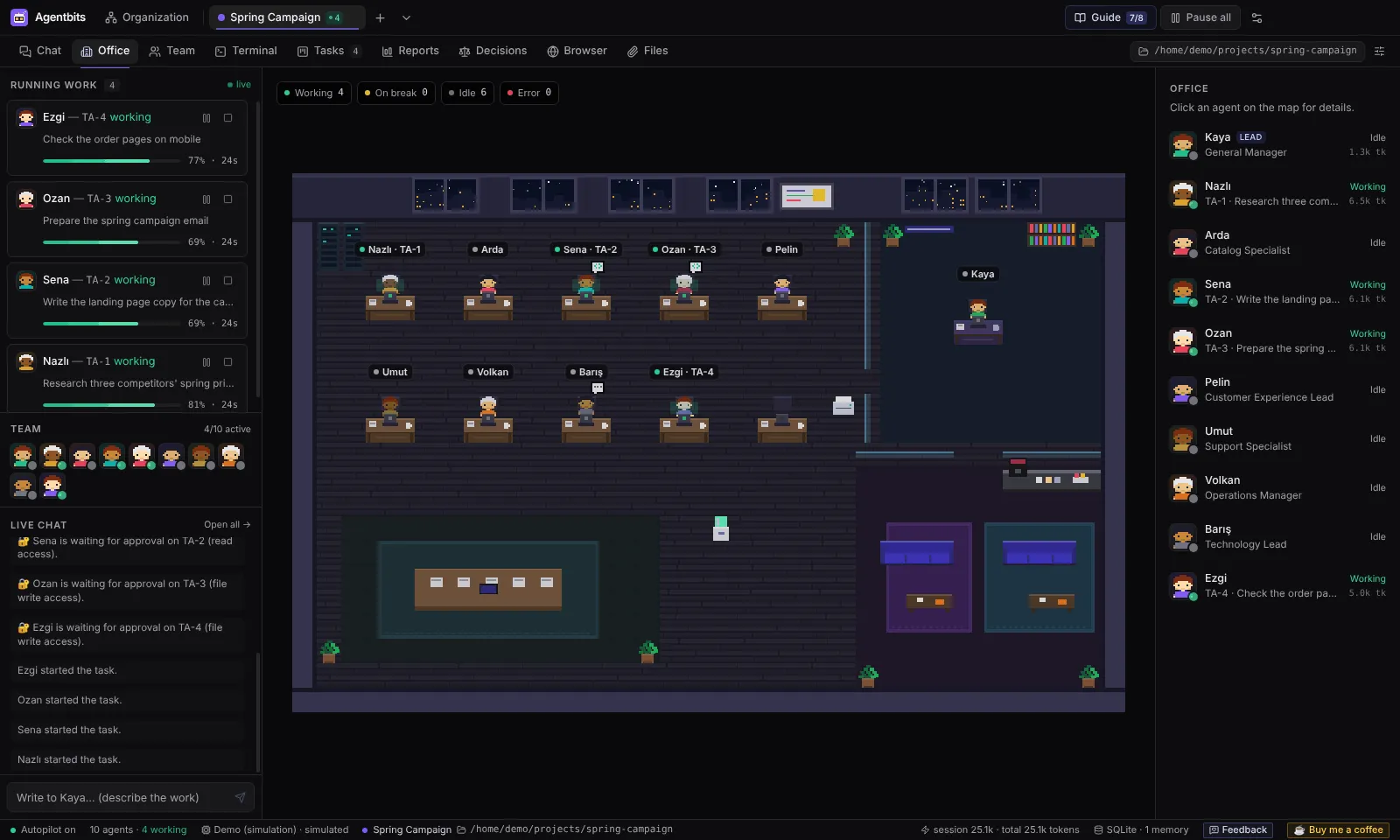
A pixel office that tells you the truth
Every agent has a desk. At a glance you see who is working, who is on a coffee break, who is waiting for your approval and who hit an error. Click an agent to see its current task and activity.
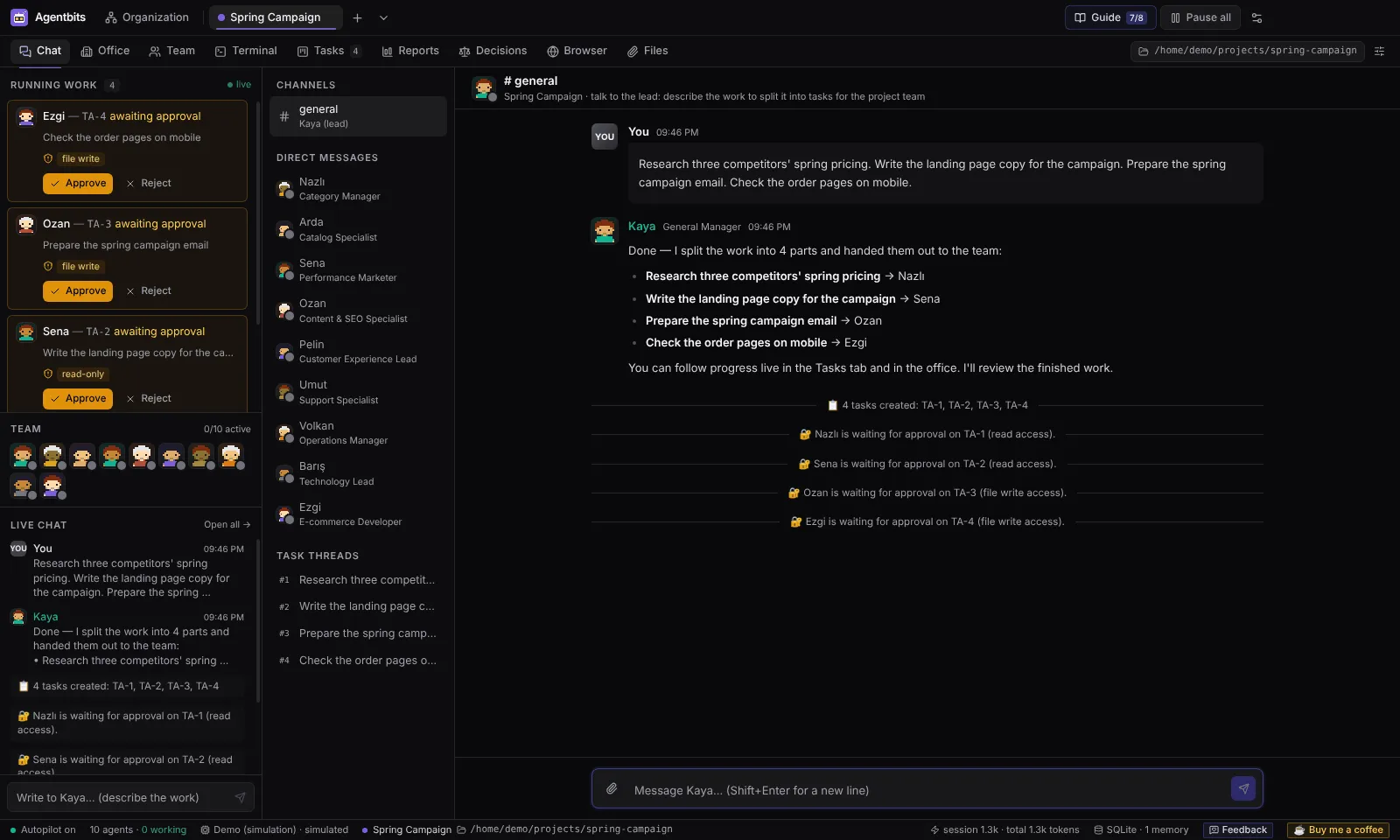
Talk to the lead, not to five chat windows
Describe the goal in the project chat. The lead turns it into tasks for the right specialists and tells you who is doing what. You can also message any agent directly.
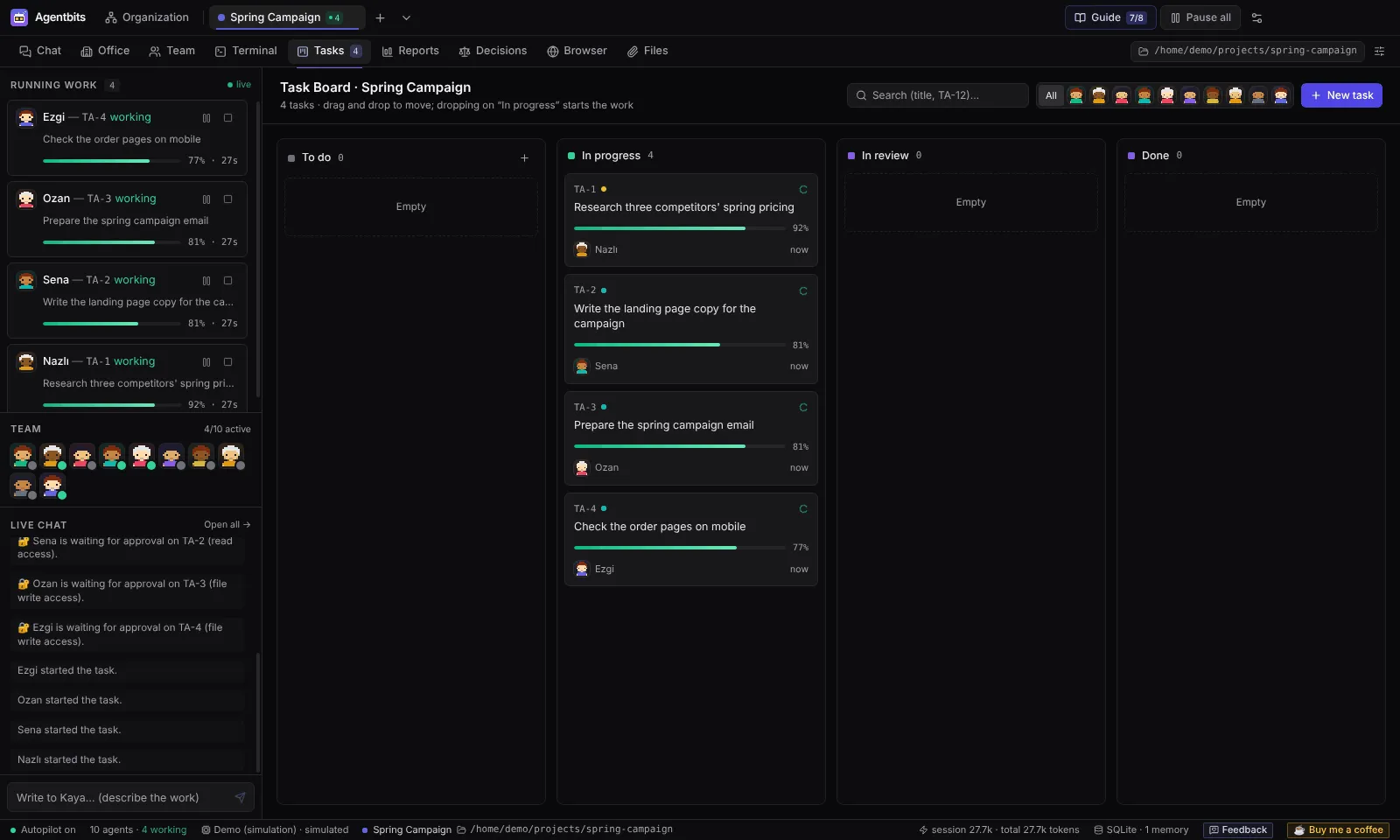
A board that moves on its own
To do, In progress, In review, Done. Drag cards between columns, open a task to see its activity, logs and runs, or start it right away.
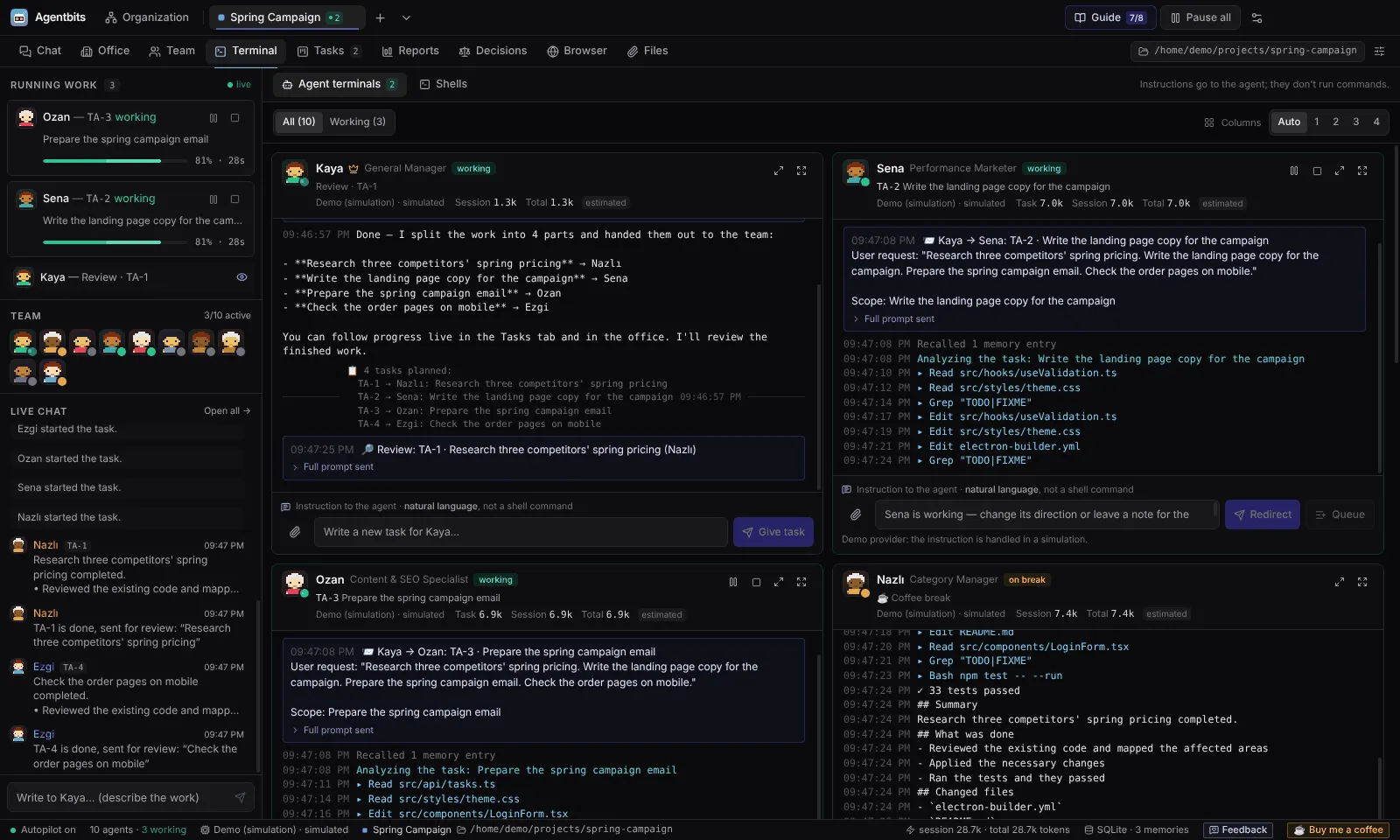
Every agent keeps a transcript
See what each agent was asked and by whom, which tools it used and how many tokens it spent. Redirect it, queue an instruction or give it a new task from the same pane. Real PowerShell and bash shells are there too.
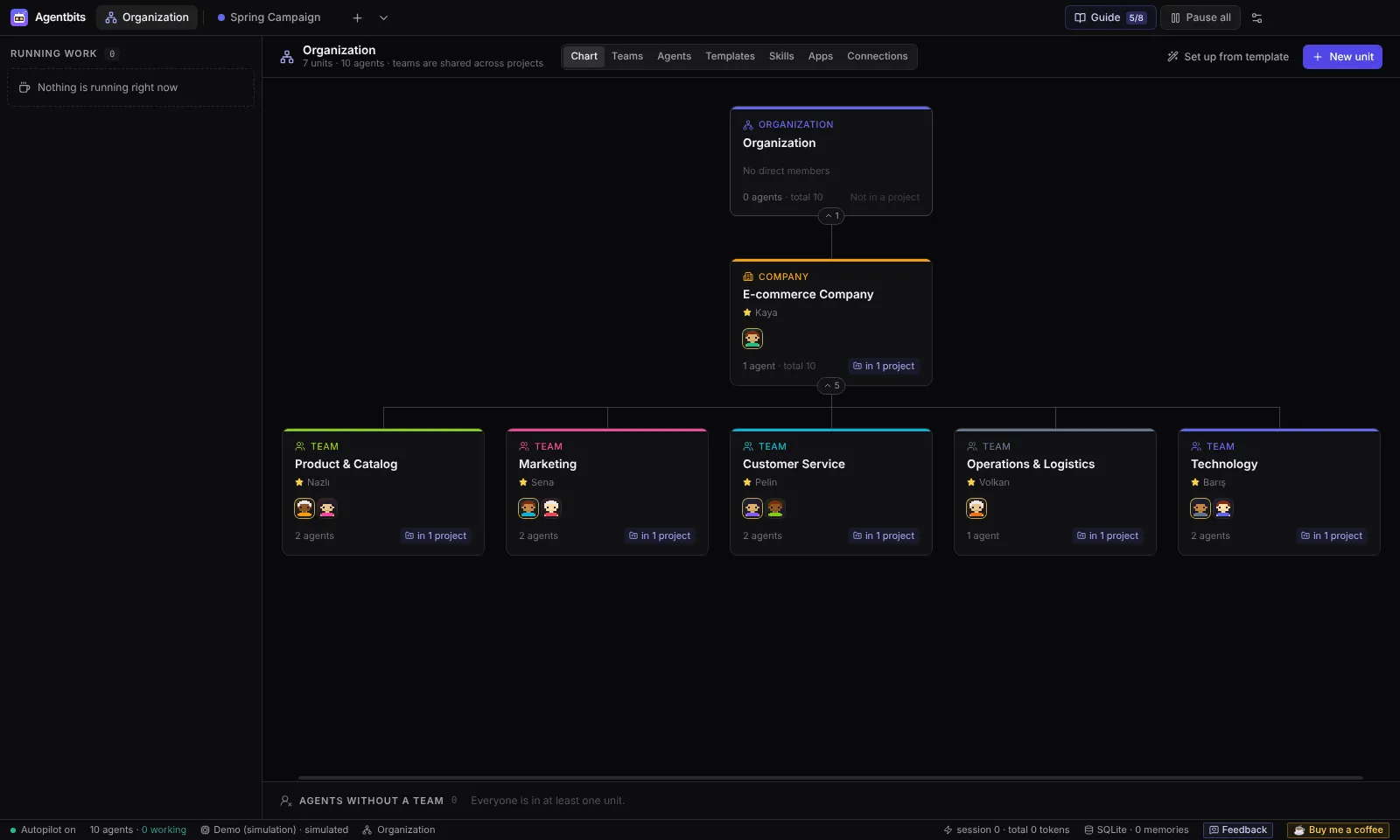
Build it like a real organization
Companies, departments and teams nested as deep as you need. An agent can belong to several teams, and one team can work on many projects.
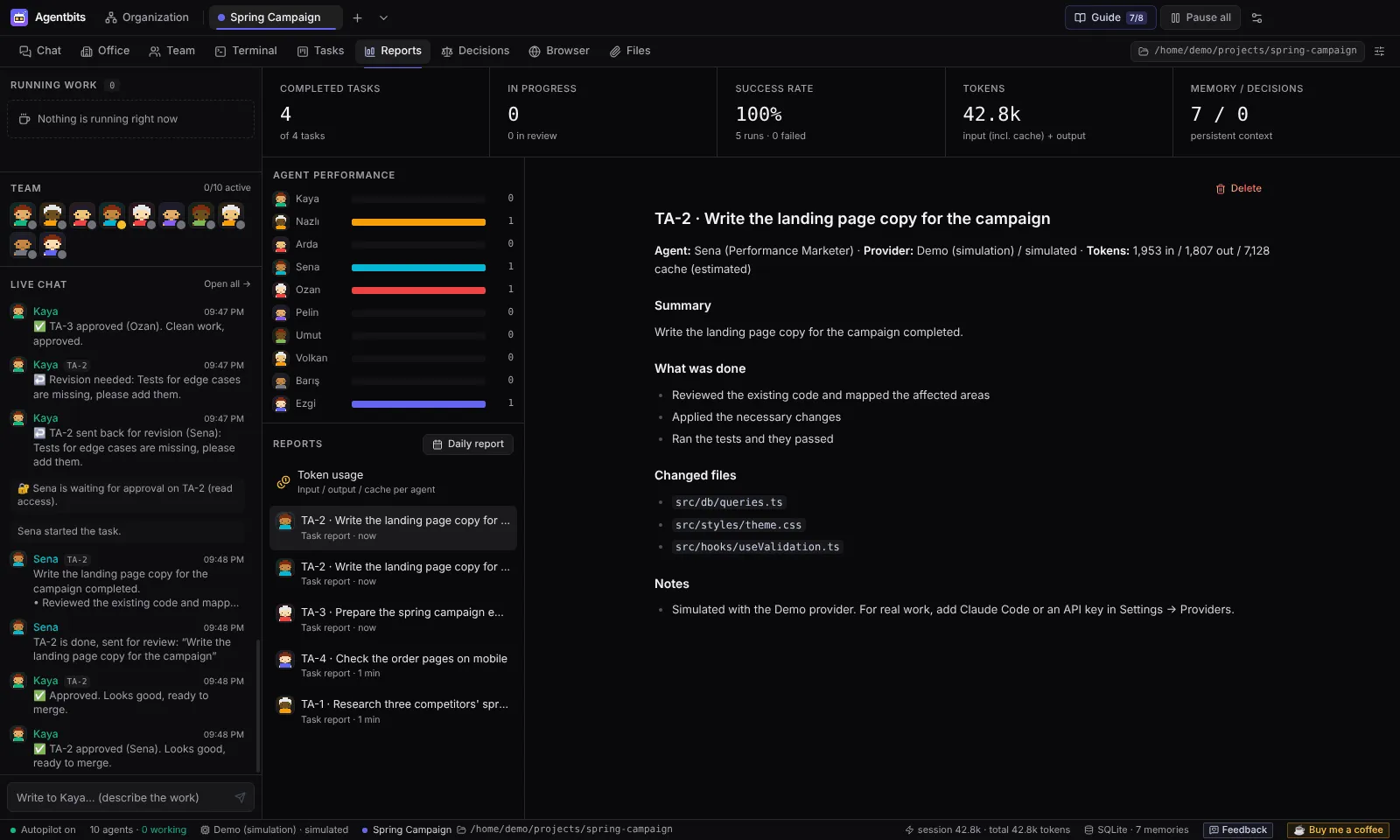
Know what the team delivered
Completed tasks, success rate, per-agent performance, daily reports and token usage for every project and every agent.
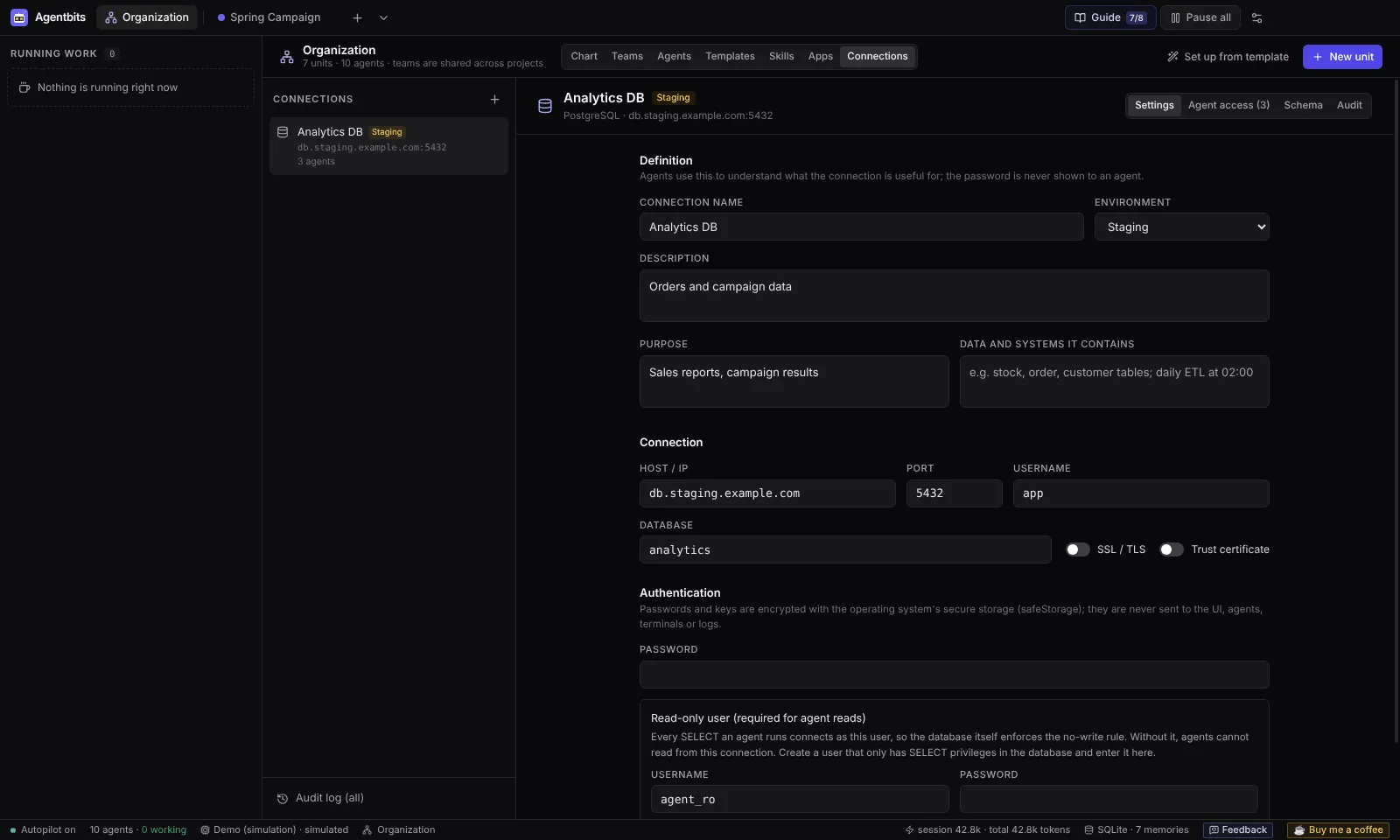
Servers and databases, with a lock on them
Connect SSH servers and PostgreSQL, MySQL/MariaDB or SQL Server databases. Access is granted per agent, Production changes wait for you, and every call is written to an audit log.
Start from a ready-made team
Templates create the units and the agents for you, each with a role, a job description, skills and a permission preset. Or build your organization from scratch.
Core Team
A five-person software team led by Atlas, with frontend, backend, testing and DevOps.
5 agentsSoftware Team
The classic team that builds a product end to end.
5 agentsResearch & Analysis
Researches markets, competitors and data, then writes decision-support reports.
4 agentsProduct Development
Product management, UX design and engineering in one team.
4 agentsMarketing & Content
Campaigns, content, SEO and social media.
4 agentsE-commerce Company
A whole company: a general manager over catalog, marketing, support, operations and technology teams.
10 agents
Template agents ask for your approval before each task, until you change that.
Use the AI provider you already have
Mix providers in one team: set a default and choose a different one per agent. What an agent can do depends on its provider and on the permissions you grant.
| Provider | What you need | Edit files and run commands | Browse the web | Connections, files, apps |
|---|---|---|---|---|
| Claude Code CLI | Claude Code installed and signed in | Yes | YesWith permission | Yes |
| Codex CLI | Codex CLI installed and signed in | YesInside the project folder | YesWith permission | Apps today, the rest planned |
| Anthropic API | An Anthropic API key | No | No | Yes |
| OpenAI API | An OpenAI API key | No | No | Yes |
| Demo | Nothing | Simulated | Simulated | Simulated |
Agentbits does not include, install or sign in to the CLIs, and it does not offer signing in with a Claude subscription inside the app.
Guardrails live in code, not in prompts
Agents get real access: files, shells, databases, servers and connected apps. Agentbits checks every powerful call in its main process, at the moment the call happens.
Local first
Your organization, projects, chats, tasks, memory and files live in a SQLite database on your computer. There is no Agentbits server, no account and no telemetry.
Deny by default
Agents see connections, files, skills and apps only when you grant them, one agent at a time.
You approve what matters
Production changes and tools set to "ask me first" wait for you. Permissions are checked again after you approve.
Every call is audited
Who, when, for which task, what was run and how it ended, for every connection and app call.
Secrets stay put
Keys and passwords are encrypted with the operating system keychain and never reach the UI, prompts, terminals or logs. Without a keychain, nothing is stored.
Untrusted stays data
File contents, query results and command output reach the model wrapped as data, never as instructions.
| Time | Agent | Connection | Action | Result |
|---|---|---|---|---|
| 09:41 | Zeki | staging-db | SELECT count(*) FROM orders | Allowed |
| 09:42 | Kaan | prod-db | UPDATE orders SET status | Waiting for you |
| 09:42 | Ece | crm (app) | contacts.search | Allowed |
| 09:43 | Mert | prod-db | DROP TABLE sessions | Denied: no permission |
| 09:44 | Kaan | web-01 (SSH) | df -h | Allowed |
One honest limit: an agent with terminal and network permissions can do what your user account can do. Grant those only to agents you trust, or run Agentbits under a restricted user.
Read the security modelWork that fits a team
Agentbits is not only for code. Each example says what it needs, because what an agent can do depends on its provider and permissions.
- Software development
Frontend, backend and test agents on one codebase, with a lead that reviews the work. Code review, bug analysis and documentation for an existing project.
Needs Claude Code or Codex CLI, a project folder, file and terminal permissions. Work on a git branch: agents really change files.
- Research and analysis
Competitor and market research: collect, compare, summarize. Compare reports, PDFs and spreadsheets you attach.
Needs Any real provider for attached files. Web research needs a CLI provider with the network permission.
- Data and reporting
Analyze Excel and CSV files and write up the findings. Answer questions from a database, then turn the results into a report.
Needs A database connection with a read-only user, and read access for the agent.
- Content and documentation
Content plans, landing page copy, campaign emails, technical documentation, editing and proofreading.
Needs Any real provider. With a CLI provider, results can be saved to the project folder.
- Projects and operations
Split a goal into tasks, follow progress and keep a record of decisions. Check servers with read-only SSH commands.
Needs An SSH connection and an access level per agent. Anything that changes Production waits for approval.
Honest about version 0.1
Agentbits is an MVP. Here is what it does not do yet, and what is already planned.
Not in 0.1
- Update itself. Install a newer version over the old one; your data is kept.
- Ship signed installers, a tested macOS package or a Linux package.
- Let API agents (Anthropic, OpenAI) edit files or run commands.
- Let agents use the built-in browser.
- Run scheduled tasks or send operating system notifications.
- Resolve conflicts when several agents edit one folder. Use git branches.
- Read scanned PDFs (OCR) or legacy .doc, .xls and .ppt files.
On the roadmap
- Checked installers on GitHub Releases, Windows first
- More providers, such as Gemini and local models
- Agents that use the browser as a tool
- Connection and file tools for Codex CLI agents
- MCP resources, prompts and sampling
- Skills from private GitHub repositories
- Spending limits per task or project
- Vector memory and custom reports
- More interface languages from the community
Put your first team to work
Start in Demo mode without an API key. Connect a real provider when you are ready.
Free for personal and other noncommercial use.